Download Pec PIR Partial Interval Data Recording
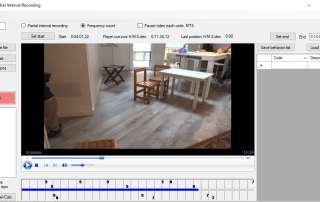
PecPIR allows behaviors count for Partial Interval Data Recording /Momentary Time Sample / Frequency Count. PecPIR è un software Windows per il conteggio e la valutazione tramite il metodo Partial Interval Data Recording /Momentary Time Sample / Frequency Count. Questa valutazione consente di dare una quantificazione numerica alla presenza di un certo comportamento target, durante un dato lasso di tempo. How does PecPIR work? Pec PIR allows to record data for Partial Interval Recording, Frequency Count, and Momentary Time Sample. PecPIR helps you with scoring videos by splitting a running video file in pre-set time intervals called cycles. Open PecPIR and use the "Open movie file" to select the video file from you computer. You can use the Player buttons (start, pause, drag video left and right) to seek start and end position and using Set start/end buttons. The textbox close to "Set end" may be used to type endtime as hours: minutes:seconds,decimals. You can either write the end time time and press "Set end" or slide the player cursor and press "Set end". During your video observation you can use the keyboard keys and numbers to mark the moment when target behaviour occurs. You can also choose later if your data will be considered as PIR or Frequency Count. This is regulated by the button Partial interval recording / Frequency count. Recording events while in Momentary Time Sampling mode briefly pauses the video at the end of each cycle allowing to press one key for each behavior that was present at the end of the cycle. Press "Resume recording..." to unpause the program after scoring. If you make any mistakes you can click on the mistakenly added entry in the left timing list to remove it. If you need to add entries after the first scoring, you can restart the recording